Master Data Analysis & Launch Your Career

DataVerse AI is a complete, industry-ready program blending data analytics, business intelligence, and AI automation. Gain hands-on mastery in Excel, SQL, Power BI, Python, and tools like ChatGPT and Gemini. Build end-to-end expertise through real-world projects, mentorship, and job-focused training.

  • location

    150k+ Placemenets to Date

  • partnership

    600+ Hiring Partners

  • rupee icon

    76 Lakhs Highest Annual

Next Batch starts in November

Register Now for FREE Demo Class

Flexible Learning Modes to Fit Your Schedule

  • Interactive Classroom Sessions
    Interactive Classroom Sessions
  • Live Virtual Instructor-Led Classes
    Live Virtual Instructor-Led Classes
  • Self-Guided Online Modules
    Self-Guided Online Modules
  • Corporate Onsite<br> Training
    Corporate Onsite
    Training

Build an Impressive Portfolio

Expand Your Career Opportunities

Stay Ahead with Industry Trends

Master Cutting-Edge Development Tools

High-Paying Careers for Data Analysts

Data analysts are critical assets across every sector—from technology giants and financial institutions to healthcare, retail, and consulting firms. Our graduates secure analytics positions at leading organizations leveraging data-driven strategies for competitive advantage and innovation.

Designation

Annual Salary

Hiring Companies

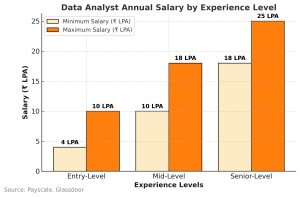
 ₹4–10 LPA (Entry-Level), ₹10–18 LPA (Mid-Level), ₹18–25 LPA (Senior-Level)

Data Analysts collect, organize, and analyze data to generate actionable insights and support decision-making processes.

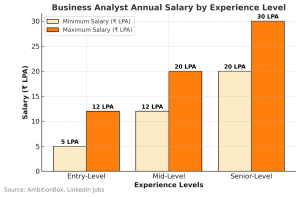
₹5–12 LPA (Entry-Level), ₹12–20 LPA (Mid-Level), ₹20+ LPA (Senior-Level)


Business Analysts identify business needs and create data-driven solutions to improve efficiency and performance.

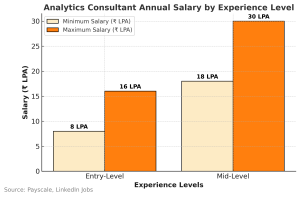
 ₹8–16 LPA (Entry-Level), ₹18–30 LPA (Mid-Level)

 Analytics Consultants work closely with clients to provide tailored data-driven solutions and strategies for business challenges.

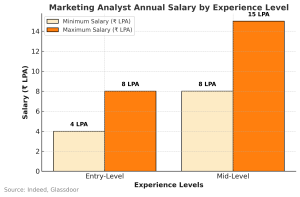
₹4–8 LPA (Entry-Level), ₹8–15 LPA (Mid-Level)

Marketing Analysts use data to evaluate marketing campaigns, identify trends, and optimize strategies for better ROI.

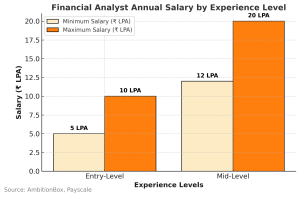
 ₹5–10 LPA (Entry-Level), ₹12–20 LPA (Mid-Level)

Financial Analysts use data analytics to study market trends, forecast revenues, and support investment decisions.

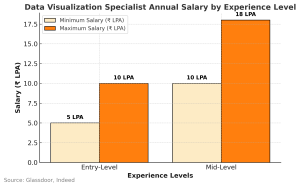
₹5–10 LPA (Entry-Level), ₹10–18 LPA (Mid-Level)

 Data Visualization Specialists create compelling charts, graphs, and dashboards using tools like Power BI, Tableau, and Python libraries.

High-Paying Careers for Data Analysts

Data analysts are critical assets across every sector—from technology giants and financial institutions to healthcare, retail, and consulting firms. Our graduates secure analytics positions at leading organizations leveraging data-driven strategies for competitive advantage and innovation.

Annual Salary

 ₹4–10 LPA (Entry-Level), ₹10–18 LPA (Mid-Level), ₹18–25 LPA (Senior-Level)

Hiring Companies

Data Analysts collect, organize, and analyze data to generate actionable insights and support decision-making processes.

Annual Salary

₹5–12 LPA (Entry-Level), ₹12–20 LPA (Mid-Level), ₹20+ LPA (Senior-Level)


Hiring Companies

Business Analysts identify business needs and create data-driven solutions to improve efficiency and performance.

Annual Salary

 ₹8–16 LPA (Entry-Level), ₹18–30 LPA (Mid-Level)

Hiring Companies

 Analytics Consultants work closely with clients to provide tailored data-driven solutions and strategies for business challenges.

Annual Salary

₹4–8 LPA (Entry-Level), ₹8–15 LPA (Mid-Level)

Hiring Companies

Marketing Analysts use data to evaluate marketing campaigns, identify trends, and optimize strategies for better ROI.

Annual Salary

 ₹5–10 LPA (Entry-Level), ₹12–20 LPA (Mid-Level)

Hiring Companies

Financial Analysts use data analytics to study market trends, forecast revenues, and support investment decisions.

Annual Salary

₹5–10 LPA (Entry-Level), ₹10–18 LPA (Mid-Level)

Hiring Companies

 Data Visualization Specialists create compelling charts, graphs, and dashboards using tools like Power BI, Tableau, and Python libraries.

Course Snapshot

Course Description

This upgraded analytics curriculum delivers a complete journey from foundational data concepts to advanced, AI-powered business intelligence. The program now integrates modern automation tools, cloud BI platforms, and next-gen AI skills—preparing learners for real industry roles in data analytics.

Progress through statistics, DBMS, Excel, Google Sheets, SQL, BI tools (Power BI, Tableau, Looker), Power Automation, and Python programming—and finish with hands-on Predictive Modeling, Automation Workflows, and GenAI-based solutions.

Training Mode

  • Hands-On Labs: 70% practical exercises using real datasets and industry tools
  • Classroom Training: Interactive sessions with immediate instructor feedback
  • Online Live Classes: Virtual training with screen-sharing and collaborative coding
  • Hybrid Learning: Combine in-person and remote sessions seamlessly
  • Self-Paced Practice: Access recorded sessions and datasets anytime

Learning Approach

  • Tool-Based Modules: Master Excel, SQL, Power BI, Tableau, and Python sequentially
  • Project-Driven Learning: Apply skills through real case studies and capstone projects
  • Industry Datasets: Work on finance, retail, and healthcare datasets for real insights
  • Certification Preparation: Python certification exam scenarios included
  • Weekly Assessments: Quizzes and practical tests to track progress

Module Breakdown

  • Statistics Foundation (15 hrs): Probability, distributions, hypothesis testing, ANOVA
  • Implementation of Descriptive Statistic (5 hrs): Measure of central tendency, Measure of Spread, Correlation analysis, Practical implementation on datasets.
  • Advanced Excel & VBA (20 hrs): Advanced formulas & data cleaning, Pivot tables & automation, Macros & VBA scripting.
  • SQL Database Management (20 hrs): Queries, joins, stored procedures, DB design
  • Power BI Mastery (20 hrs): DAX functions, visualizations, publishing, AI features
  • Tableau Visualization (15 hrs): Interactive dashboards, maps, and advanced charts

  • Python for Analytics (30 hrs): Pandas, NumPy, visualization, ML basics

Tools & Technologies Covered

  • Statistical Analysis: Descriptive & inferential stats, regression, correlation
  • Spreadsheets: Microsoft Excel (formulas, pivots, macros, VBA)
  • Business Intelligence: Power BI & Tableau dashboards
  • Databases: MySQL, SQL Server fundamentals
  • Programming: Python (Pandas, NumPy, Matplotlib, Seaborn)
  • Additional Skills: Web scraping, automation, API integration

Who Should Enroll

  • Fresh graduates from any background seeking entry into high-growth analytics careers
  • Professionals in finance, marketing, operations, or HR looking to leverage data analytics
  • Business analysts & consultants strengthening their toolkit with Excel, SQL, Python, BI tools
  • IT professionals and developers transitioning into data science or analytics roles
  • Entrepreneurs analyzing customer behavior, sales patterns, and operational metrics
  • Career changers from non-technical backgrounds seeking structured, placement-ready training

Course Outcomes & Skills You Master

  • Statistical Analysis Mastery: Apply descriptive & inferential statistics including probability, hypothesis testing, ANOVA, chi-square, and correlation analysis
  • Advanced Excel & VBA Expertise: Create dashboards, automate tasks with macros, and master complex formulas for business reporting
  • SQL Database Proficiency: Write advanced queries, design databases, and optimize performance for large datasets
  • Business Intelligence Visualization: Build interactive dashboards in Power BI & Tableau with AI insights and DAX functions
  • Python Data Analytics: Manipulate data using Pandas, NumPy, perform automation, and create data visualizations & ML models
  • End-to-End Analytics Projects: Execute workflows from data collection to visualization and actionable recommendations

Data Analyst Course Curriculum

Master Tools, Techniques, and Real-World Applications
Prerequisites: Basic knowledge of Excel and statistics is recommended. Interest in data analysis, business intelligence, and problem-solving will help you grasp advanced analytics efficiently.

Statistics

Data Types, Measure Of central tendency, Measures of Dispersion,
Graphical Techniques, Skewness & Kurtosis, Box Plot 
Descriptive Stats 
Random Variable, Probability, Probability Distribution, Normal Distribution, SND, Expected Value 
Sampling Funnel, Sampling Variation, Central Limit Theorem, Confidence interval 
Introduction to Hypothesis Testing 
Hypothesis Testing (2 proportion test, 2 t sample t test) 
Anova and Chisquare 
Data Cleaning 
Imputation Techniques 
Scatter Diagram 
Correlation Analysis

Power BI

Power BI Introduction
Power BI Components
Getting Data using Power BI
Power BI Transformations
Creating Data Models
Power BI Charts
Power BI Filters
Power BI Visualizations
Exploring Data in Power BI
Power BI and Excel
Power BI Publishing and Sharing
Power BI Integration with Data Sources
Data Analysis Expressions (DAX)
  • 2.13 Math & Stats
  • 2.13 SUMX & Calculate Function
  • 2.13 Related Function
  • 2.13 All Function
  • 2.13 Aggregate Functions
  • 2.13 Date Functions
  • 2.13 Logical Function
  • 2.13 String Functions
  • 2.13 Filter Functions
  • 2.13 Trigonometric Functions
  • 2.13 Time Intelligence Functions
Reports – Objects & Charts, Formatting Charts
  • 2.14 Report Interactions
  • 2.14 Bookmarks
  • 2.14 Managing Roles
  • 2.14 Custom Visuals
  • 2.14 Desktop vs Phone Layout
  • 2.14 Artificial Intelligence Visuals – Key Influencers

Tableau

What is Data Visualization
  • 3.01 Advantages & Disadvantages of Visualizations
  • 3.01 Why Data Visualization is Important
  • 3.01 Understanding Data
  • 3.01 Different Types of Data Visualizations
Tableau – Data Visualization Tool
Introduction to Tableau
  • 3.03 What is Tableau?
  • 3.03 Overview of Tableau Tool (Servers, Data, Visualizations)
Extensions in Tableau
Features of Tableau Desktop
Tableau – Joins and Data Pane
Tableau Data Pane
Pivot Table and Split Tables in Tableau
In-built Charts in Tableau
  • 3.09 Basic Charts
  • 3.09 Text Tables
  • 3.09 Highlight Tables
  • 3.09 Bar Charts
  • 3.09 Stacked Bar
  • 3.09 Line Graphs
  • 3.09 Dual Axis
  • 3.09 Pie Charts
Maps in Tableau
Data Interpretation

Microsoft Excel

Getting Started with Excel
Workbook Protection & Security
Data Formats, Data Formatting & Alignment
Hands-on Practice on Short Keys
Conditional Formatting
Advanced Conditional Formatting Techniques
Graphs & Charts
Advanced Charts – Waterfall / Bridge Graphs
Data Tools
  • 4.09 Filtering
  • 4.09 Sorting
  • 4.09 Remove Duplicates
  • 4.09 Data Validation
  • 4.09 Grouping
Absolute and Relative Referencing Concepts
Case Studies on Absolute and Relative Referencing
Specialized Functions / Formulas
Lookup Functions
  • 4.13 VLOOKUP & its Limitations
  • 4.13 HLOOKUP
  • 4.13 INDEX-MATCH
  • 4.13 HYPERLINK
  • 4.13 INDIRECT
  • 4.13 OFFSET
  • 4.13 TRANSPOSE
VLOOKUP Case Studies
  • 4.14 General VLOOKUP Problems
  • 4.14 VLOOKUP with MATCH Function
  • 4.14 VLOOKUP using (*) Problems
  • 4.14 VLOOKUP using Running COUNTIF
  • 4.14 Nested VLOOKUP
Text Formulas
  • 4.15 CHAR
  • 4.15 CONCATENATE
  • 4.15 EXACT
  • 4.15 FIND
  • 4.15 LEFT / RIGHT
  • 4.15 PROPER
  • 4.15 SEARCH
  • 4.15 MID
  • 4.15 UPPER
Logical Formulas
  • 4.16 AND
  • 4.16 IF
  • 4.16 IFERROR
  • 4.16 NOT
  • 4.16 OR
  • 4.16 TRUE
Date & Time Formulas
  • 4.17 DAY
  • 4.17 DATE
  • 4.17 HOUR
  • 4.17 MINUTE
  • 4.17 SECOND
  • 4.17 TIME
  • 4.17 MONTH
  • 4.17 YEAR
  • 4.17 TODAY
  • 4.17 WEEKDAY
  • 4.17 NOW
Mathematical Formulas
  • 4.18 SUM
  • 4.18 SUMIF / SUMIFS
  • 4.18 COUNT / COUNTIF
  • 4.18 MOD
  • 4.18 PRODUCT
  • 4.18 SUMPRODUCT
  • 4.18 ROUNDUP
  • 4.18 ARRAY FORMULAS
Pivot Reports / Dashboard
  • 4.19 Pivot Tables & Pivot Charts
  • 4.19 Waterfall Mode

SQL

Comparison
Types of SQL Commands
Data Definition Language (DDL)
  • 5.03 Create, Drop, Truncate, Alter, and Rename Objects
Data Query Language (DQL)
  • 5.04 Select Statements
Data Manipulation Language (DML)
Data Control Language (DCL) and Transaction Control Language (TCL)
  • 5.06 Grant, Revoke, and Transaction Statements
SQL Data Types
  • 5.07 Numeric
  • 5.07 Date and Time
  • 5.07 LOB Types
DML Commands
  • 5.08 Insert, Update, and Delete Statements
DDL Commands
  • 5.09 Create and Drop Databases
SQL Transactions
  • 5.10 Examples
ACID Properties
TCL Statements
  • 5.12 Start, Commit, and Rollback Statements
Auto Commit
SavePoints
  • 5.14 Identifier
  • 5.14 Rollback and Release
Database Objects
Tables
  • 5.16 Creating, Altering, and Dropping Tables
Views
  • 5.17 Advantages
  • 5.17 Creating and Dropping Views
Indexes
Stored Objects
  • 5.19 Types of Stored Objects
Stored Procedures
Operators and Functions
Joining Tables
  • 5.22 Inner Join
  • 5.22 Left Join
  • 5.22 Right Join
Advantages of Procedures
Database Triggers
Accessing Database from R and Python
Triggers

Python

Installation of Python
Python Strings
Python Lists
Python Datatypes & Python Loops
Python Tuples
Python Dictionary
Python Date & Time
Python Operators
Python Functions
Python I/O Functions
Debugging & Python Database Access – MySQL
Working with CSV & Excel Files
Advanced Data Types
  • 6.13 Deque in Python
  • 6.13 Python Dict
  • 6.13 Python Tuples
  • 6.13 Python Frozenset
  • 6.13 Difference between List, Tuple, Dict, Set, and FrozenSet
Python Comprehensions
  • 6.14 List Comprehensions
  • 6.14 Set Comprehensions
  • 6.14 Dictionary Comprehensions
  • 6.14 Set Comprehensions
NumPy
Pandas
Data Analysis & Visualization in Python
Web Scraping
Mini Project
  • Email Automation

Looker Studio

Data Sources & Connections
Creating Reports & Dashboards
Dimensions & Metrics
Calculated Fields
Filters, Controls & Segments
Blending Data (Joins)
Scorecards, Tables, Time Series
Geo Maps & Charts
Custom Visualizations
Drill-Downs & Interactions
Report Sharing & Permissions
Embedding Dashboards
Performance Optimization
Looker Studio with Google Sheets
Looker Studio with BigQuery
Looker Studio for Marketing & Business Analytics

BigQuery

Data Warehousing Concepts
BigQuery Architecture
Datasets, Tables & Schemas
Loading Data (CSV, JSON, Parquet, Cloud Storage)
Query Editor & Console
Standard SQL in BigQuery
Filtering, Sorting & Aggregation
Joins & Subqueries
Nested & Repeated Fields
User-Defined Functions (UDFs)
Partitions & Clustering
BigQuery ML (Machine Learning Models)
Materialized Views
Scheduled Queries
Performance Optimization & Query Cost Management
BigQuery with Looker Studio
BigQuery with Python
BigQuery for Marketing, Product & Business Analytics

Power Automate

Introduction to Workflow Automation
Types of Flows (Automated, Instant, Scheduled)
Connecting Apps & Services
Triggers & Actions
Conditions, Loops & Branching
Approvals & Notifications
Power Automate with Microsoft 365 (Excel, Outlook, Teams, SharePoint)
Power Automate Desktop (RPA)
Web Automation & Screen Recording
Data Collection & Form Automation
Connectors (Standard & Premium)
Expressions & Dynamic Content
Error Handling & Monitoring
Flow Optimization & Best Practices
Power Automate with Power BI
Power Automate with SQL & Databases
Building Business Process Automation
Sharing, Exporting & Managing Flows

R (Programming Language for Data Analysis)

Introduction to R & RStudio
R Syntax & Data Types
Vectors, Lists, Matrices & Data Frames
Data Import (CSV, Excel, Databases, APIs)
Data Cleaning & Transformation (dplyr, tidyr)
Exploratory Data Analysis (EDA)
Data Visualization (ggplot2)
Factors, Dates & Strings
Control Structures & Functions
Apply Family Functions
Working with Tidyverse
Statistical Analysis in R
Correlation & Regression
ANOVA & Hypothesis Testing
Time Series Analysis
Machine Learning Basics (caret / tidymodels)
R Markdown & Reporting
R for Data Wrangling & Automation
R Integration with Power BI & SQL

AI Tools (ChatGPT, Gemini, Claude)

Introduction to AI Tools
Prompt Engineering Basics
Productivity & Office Automation
Content Creation Using AI Tools
Data Analysis with AI Tools
Coding & Technical Assistance
Advanced Prompt Engineering
Real-World Use Cases
Ethical & Responsible AI Usage
Capstone AI Project

Build Real-World Data Analytics Projects

Apply your skills through comprehensive projects including customer segmentation analysis, sales forecasting dashboards, financial risk assessment models, marketing campaign optimization, supply chain analytics, and predictive modeling using Python—all based on authentic business scenarios and datasets.

The UltimateToolkit

Industry-Recognized Data Analyst Certification

Get a Data Analyst Certification that is respected and acknowledged by leading businesses in a variety of sectors. You can demonstrate your proficiency with Excel, SQL, Python, R, Power BI, Tableau, and other crucial analytics tools with this certification. Show that you can manage analytics projects from start to finish, from data cleaning and analysis to reporting and visualization.
In addition to helping you stand out in a competitive job market, this certification opens doors to high-paying positions in IT, finance, healthcare, e-commerce, and consulting by validating your practical skills and data-driven decision-making abilities.

  • 20000+

    Professionals Trained

  • 20+

    Countries & Counting

  • 100+

    Corporate Served

Our Proven Track Record Shows that we Walk the Talk

Why Choose Grras Solutions?

Industry-Aligned Curriculum

Master a curriculum crafted and constantly updated by industry experts to match real-world trends, ensuring every concept and project builds job-ready, future-proof skills.

Personalized Career Support

Receive one-on-one mentorship, resume reviews, mock interviews, and complete placement assistance through our 500+ hiring partners to accelerate your tech career.

Expert Mentorship

Learn directly from certified professionals with years of hands-on experience who guide you through every module, project, and career milestone personally.

Real-World Projects

Gain practical exposure by working on live, industry-grade projects that mirror real business challenges, strengthening your technical execution and problem-solving abilities.

Proven Track Record

Join thousands of successful learners who have launched rewarding tech careers through Grras. Our consistent placement results, trusted partnerships, and alumni success stories speak for the quality of our training.

From Training to Placement A Roadmap to Success

Navigate your professional journey with a comprehensive guide that transforms learning into opportunity. Discover proven strategies to build skills, gain experience, and secure your ideal position in today's competitive job market.

Expert Training sessions123

Focus on industry-relevant skills

Hands on projects & Assignments

Real-world projects to implement learned concepts.

Performance Tracking

Weekly tests to assess progress

Mock Interviews

Mock sessions with real-time feedback from experts

Expert Sessions

Host industry experts for advanced technical guidance

Skill Refinement Tasks

Focus on problem-solving, critical thinking, and domain expertise

Effective Communication & Presentation Skills

Through interactive classes, students enhance both verbal and non-verbal communication, while also learning to present their ideas clearly, confidently, and effectively.

Aptitude & Logical Reasoning Training

Enhances students' problem-solving, analytical thinking, and numerical ability-preparing them for competitive exams and placement tests.

Step by step guidance

Help students structure professional, impactful resumes

Industry networking

* Partner with top companies for hiring pipelines
* Conduct webinars and sessions with recruiters

Placement coordination

* Connect candidates to aligned opportunities
* Organize hiring events and recruitment drives

Stress Management Techniques

Equip students to handle high-pressure interview situations

Scenario-Based Training

Prepare students for various interview formats, including case studies, coding rounds, and group discussions

Individual Sessions

* Address specific weaknesses and barriers to success.
* Develop personalized improvement plans

Our mission revolves around our learners

Promising 100% #CareerSuccess!

Download Placement Report

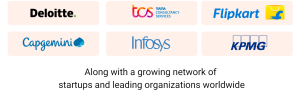
600+ Hiring Partners Across Industries

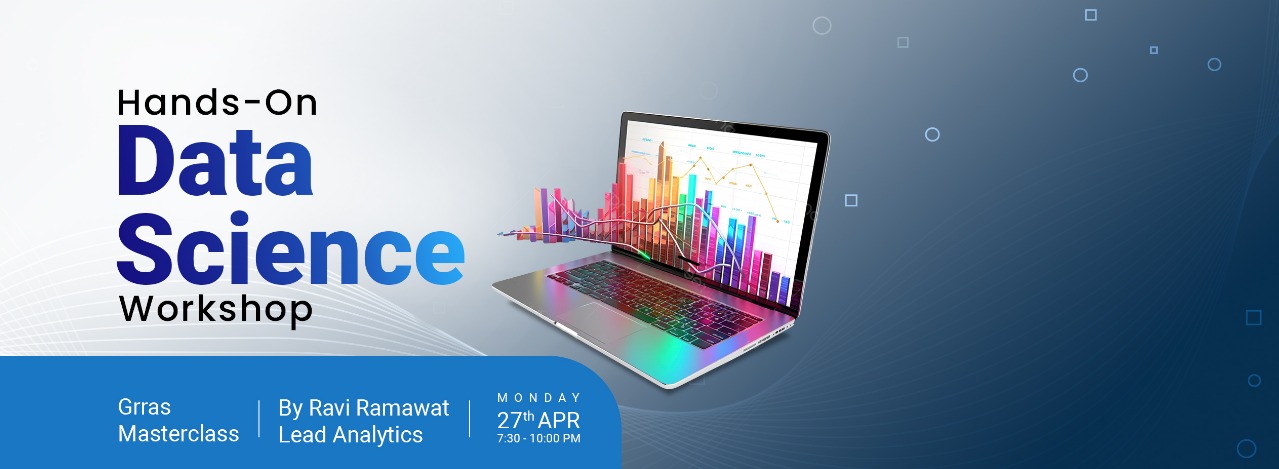
Join Our Exclusive Workshops!

Discover daily sessions covering business analytics, graphic design, Python, and more. Reserve your spot today!

Highly Recommended Course

Need Help? Talk to us at +91-8448-448523 or WhatsApp us at +91-9001-991813 or REQUEST CALLBACK
Enquire Now